> ## Documentation Index
> Fetch the complete documentation index at: https://citodocs.prostack.host/llms.txt
> Use this file to discover all available pages before exploring further.
# Viewing Logs
> Access PHP, Nginx, and access logs via the dashboard or command line
## Via the dashboard
Cito has a built-in log viewer that can show you the following:
* PHP Error logs: any logs generated by PHP (where relevant).
* Nginx error logs: this shows you any logs generated by the web server itself.
* Nginx access logs: shows you all requests to your site.
You can find this by browsing to Site settings, then clicking the Logs tab.
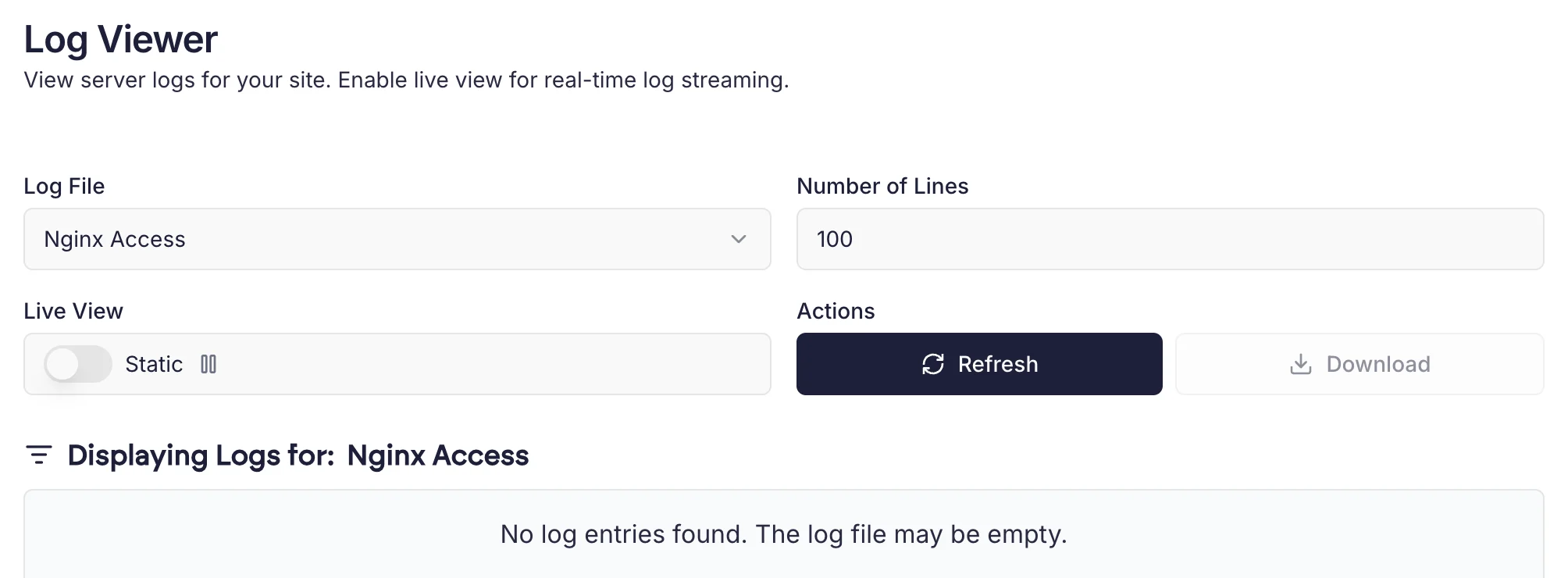 The log viewer has a "Live" mode which will stream logs in real time. You can also manually refresh or download logs as text files.
## Common log locations
Below is a list of the common Cito logfiles you may need to utilise, including the path to use and the default retention.
| Type | Retention (days) | Location |
| ----------------- | ---------------- | -------------------------------------- |
| Nginx Access Logs | 14 | /var/log/nginx/``.log |
| Nginx Error Logs | 14 | /var/log/nginx/``.err |
| PHP-FPM Errors | 12 | /var/log/php``.log |
| MySQL Errors | 7 | /var/lib/mysql/``.err |
Each individual domain has its own access and error logs for ease of reference.
## How are PHP error logs generated?
PHP errors are logged to the file `error_log` in the directory they were generated in (e.g. `public_html`).
The log viewer has a "Live" mode which will stream logs in real time. You can also manually refresh or download logs as text files.
## Common log locations
Below is a list of the common Cito logfiles you may need to utilise, including the path to use and the default retention.
| Type | Retention (days) | Location |
| ----------------- | ---------------- | -------------------------------------- |
| Nginx Access Logs | 14 | /var/log/nginx/``.log |
| Nginx Error Logs | 14 | /var/log/nginx/``.err |
| PHP-FPM Errors | 12 | /var/log/php``.log |
| MySQL Errors | 7 | /var/lib/mysql/``.err |
Each individual domain has its own access and error logs for ease of reference.
## How are PHP error logs generated?
PHP errors are logged to the file `error_log` in the directory they were generated in (e.g. `public_html`).