> ## Documentation Index
> Fetch the complete documentation index at: https://citodocs.prostack.host/llms.txt
> Use this file to discover all available pages before exploring further.
# Changing PHP Versions
> How to change PHP versions for your Cito sites
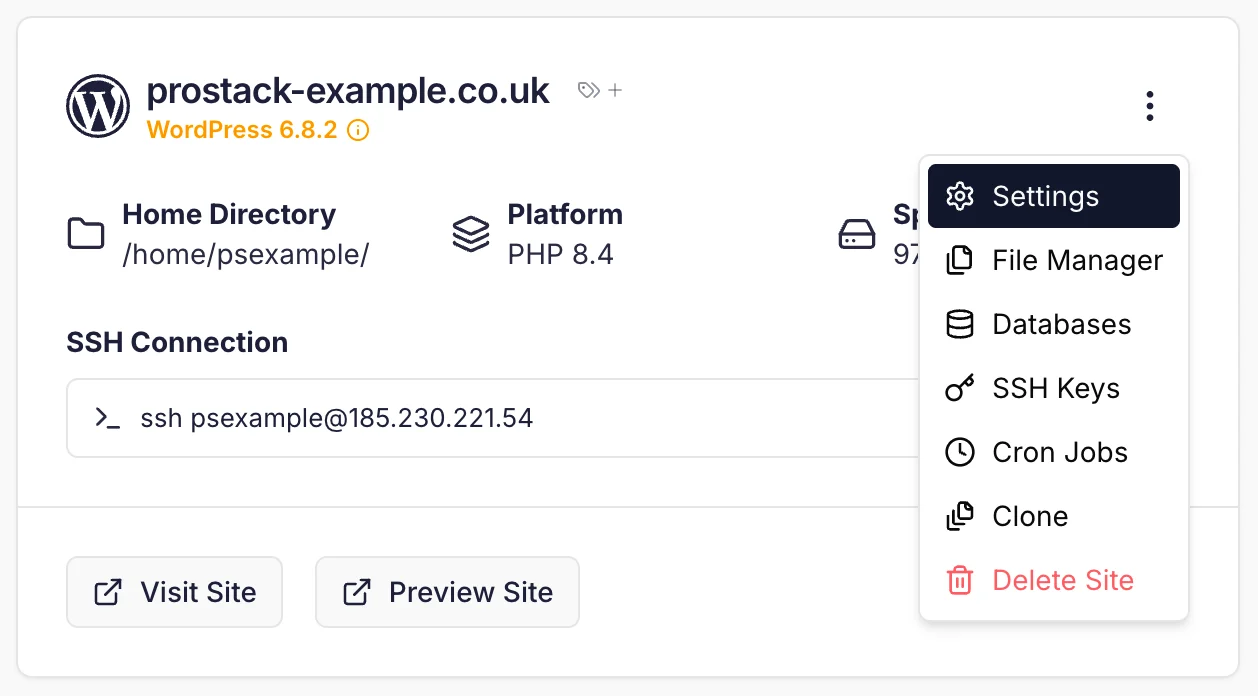
To change a site's PHP version, click on the context menu in the site card, then "Settings".
 On the Site Settings page you can pick a different PHP version.
 Click 'Save Changes' to apply the PHP version change.
### What versions are supported?
We follow the official PHP support policies detailed on [https://www.php.net/supported-versions.php](https://www.php.net/supported-versions.php).
You can view the supported versions on the Site Settings page.
If you require another version of PHP to be installed, please contact Support who can arrange this.
### Using the CLI
To switch PHP versions on Cito sites, use the `phpmgr` utility:
```
cito~ # phpmgr
Usage: phpmgr -d -s
-d: Domain name (required).
-s: Set PHP version.
-l: List available PHP versions.
Example: phpmgr -d test.com -s 8.2
(Sets the domain test.com to PHP 8.2).
```
The script automatically updates configuration files and switches to the new version. It will output the available versions and warn if you are trying to use one that is not available.
## Command-line PHP
It's important to note that if you're using a different PHP version in your CLI scripts you'll need to either reference that version's binary directly, or add an alias to your `bash_profile` to switch to it.
For example, if your server has a default version of PHP 7.4 but you're using PHP 8.0, you will need to invoke it at the command-line as follows:
```bash theme={null}
/usr/bin/php8.0
```
You can also add an alias for `php` to your bash\_profile as follows:
```bash theme={null}
echo "alias php='/usr/bin/php8.0'" >> ~/.bash_profile
```
(Substituting the version appropriately).
## What extensions are enabled?
By default, the following extensions are enabled:
* bcmath
* intl
* gd
* mbstring
* cli
* common
* curl
* imap
* json
* mysql
* opcache
* xml
* zip
* readline
* soap
* redis
Contact support if you need anything else installed.
Click 'Save Changes' to apply the PHP version change.
### What versions are supported?
We follow the official PHP support policies detailed on [https://www.php.net/supported-versions.php](https://www.php.net/supported-versions.php).
You can view the supported versions on the Site Settings page.
If you require another version of PHP to be installed, please contact Support who can arrange this.
### Using the CLI
To switch PHP versions on Cito sites, use the `phpmgr` utility:
```
cito~ # phpmgr
Usage: phpmgr -d -s
-d: Domain name (required).
-s: Set PHP version.
-l: List available PHP versions.
Example: phpmgr -d test.com -s 8.2
(Sets the domain test.com to PHP 8.2).
```
The script automatically updates configuration files and switches to the new version. It will output the available versions and warn if you are trying to use one that is not available.
## Command-line PHP
It's important to note that if you're using a different PHP version in your CLI scripts you'll need to either reference that version's binary directly, or add an alias to your `bash_profile` to switch to it.
For example, if your server has a default version of PHP 7.4 but you're using PHP 8.0, you will need to invoke it at the command-line as follows:
```bash theme={null}
/usr/bin/php8.0
```
You can also add an alias for `php` to your bash\_profile as follows:
```bash theme={null}
echo "alias php='/usr/bin/php8.0'" >> ~/.bash_profile
```
(Substituting the version appropriately).
## What extensions are enabled?
By default, the following extensions are enabled:
* bcmath
* intl
* gd
* mbstring
* cli
* common
* curl
* imap
* json
* mysql
* opcache
* xml
* zip
* readline
* soap
* redis
Contact support if you need anything else installed.